C#做的在线升级小程序
- 时间:2015年04月02日 15:23:46 来源:魔法猪系统重装大师官网 人气:10161


日前收到一个小任务,要做一个通用的在线升级程序。更新的内容包括一些dll或exe或、配置文件。升级的大致流程是这样的,从服务器获取一个更新的配置文件,经过核对后如有新的更新,则会从服务器下载相应的文件更新到被升级的程序目录下。如果被升级的程序在升级之前已经启动,程序则会强制关闭它,待到升级完成之后重新启动相应的程序。在升级之前程序会自动备份一次,以防升级失败造成程序不能运行。
首先来的是数据实体
 1     public class FileENT
 2     {
 3         public string FileFullName { get; set; }
 4
 5         public string Src { get; set; }
 6
 7         public string Version { get; set; }
 8
 9         public int Size { get; set; }
10
11         public UpdateOption Option { get; set; }
12     }
13
14     public enum UpdateOption
15     {
16         add,
17         del
18 }下面这个类时程序的一些参数,包括了系统的配置参数,为了程序能通用一点,就加了配置上去。
 1     public class AppParameter
 2     {
 3         ///
 4         /// 备份路径
 5         ///
 6         public static string BackupPath = ConfigurationManager.Appsettings["backupPath"];
 7
 8         ///
 9         /// 更新的URL
10         ///
11         public static string ServerURL = ConfigurationManager.AppSettings["serverURL"];
12
13         ///
14         /// 本地更新文件全名
15         ///
16         public static string LocalUPdateConfig = ConfigurationManager.AppSettings["localUPdateConfig"];
17
18         ///
19         /// 版本号
20         ///
21         public static string Version = ConfigurationManager.AppSettings["version"];
22
23         ///
24         /// 更新程序路径
25         ///
26         public static string LocalPath = AppDomain.CurrentDomain.BaseDirectory;
27
28         ///
29         /// 主程序路径
30         ///
31         public static string MainPath = ConfigurationManager.AppSettings["mainPath"];
32
33         ///
34         /// 有否启动主程序
35         ///
36         public static bool IsRunning = false;
37
38         ///
39         /// 主程序名
40         ///
41         public static List AppNames = ConfigurationManager.AppSettings["appName"].Split(';').ToList();
42     }
接着就介绍程序的代码
程序是用窗体来实现的,下面三个是窗体新添加的三个字段
1         private bool isDelete=true; //是否要删除升级配置
2         private bool runningLock = false;//是否正在升级
3         private Thread thread; //升级的线程
载入窗体时需要检查更新,如果没有更新就提示”暂时无更新”;如果有更新的则先进行备份,备份失败的话提示错误退出更新。
 1             if (CheckUpdate())
 2             {
 3                 if (!Backup())
 4                 {
 5                     MessageBox.Show("备份失败!");
 6                     btnStart.Enabled = false;
 7                     isDelete = true;
 8                     return;
 9                 }
10
11             }
12             else
13             {
14                 MessageBox.Show("暂时无更新");
15                 this.btnFinish.Enabled = true;
16                 this.btnStart.Enabled = false;
17                 isDelete = false;
18                 this.Close();
19             }
在这些操作之前还要检测被更新程序有否启动,有则将其关闭。
1 ListprocessNames = new List (); 2 string mainPro = string.Empty; 3 processNames.AddRange(AppParameter.AppNames); 4 for (int i = 0; i < processNames.Count; i++) 5 { 6 processNames[i] = processNames[i].Substring(processNames[i].LastIndexOf('\\')).Trim('\\').Replace(".exe", ""); 7 } 8 mainPro = processNames.FirstOrDefault(); 9 AppParameter.IsRunning = ProcessHelper.IsRunningProcess(mainPro); 10 if (AppParameter.IsRunning) 11 { 12 MessageBox.Show("此操作需要关闭要更新的程序,请保存相关数据按确定继续", "提示", MessageBoxButtons.OK, MessageBoxIcon.Warning); 13 foreach (string item in processNames) 14 ProcessHelper.CloseProcess(item); 15 }
另外上面用到的CheckUpdate( )和Backup( )方法如下
1 ///2 /// 检查更新 有则提示用户 确认后下载新的更新配置 3 /// 4 ///用户确认信息 5 public static bool CheckUpdate() 6 { 7 bool result = false; 8 9 HttpHelper.DownLoadFile(AppParameter.ServerURL, AppParameter.LocalPath + "temp_config.xml"); 10 if (!File.Exists(AppParameter.LocalUPdateConfig)) 11 result = true; 12 else 13 { 14 long localSize = new FileInfo(AppParameter.LocalUPdateConfig).Length; 15 long tempSize = new FileInfo(AppParameter.LocalPath + "temp_config.xml").Length; 16 17 if (localSize >= tempSize) result = false; 18 19 else result = true; 20 } 21 22 if (result) 23 { 24 if (File.Exists(AppParameter.LocalUPdateConfig)) File.Delete(AppParameter.LocalUPdateConfig); 25 File.Copy(AppParameter.LocalPath + "temp_config.xml", AppParameter.LocalUPdateConfig); 26 } 27 else 28 result = false; 29 30 File.Delete(AppParameter.LocalPath + "temp_config.xml"); 31 return result; 32 } 33 34 ///35 /// 备份 36 /// 37 public static bool Backup() 38 { 39 string sourcePath = Path.Combine(AppParameter.BackupPath, DateTime.Now.ToString("yyyy-MM-dd HH_mm_ss")+"_v_"+AppParameter.Version + ".rar"); 40 return ZipHelper.Zip(AppParameter.MainPath.Trim() , sourcePath); 41 }
下面则是更新的部分的代码,使用了多线程,出于两方面的考虑,一是进度条需要;二是如果用单线程,万一更新文件下载时间过长或者更新内容过多,界面会卡死。
1 ///2 /// 更新 3 /// 4 public void UpdateApp() 5 { 6 int successCount = 0; 7 int failCount = 0; 8 int itemIndex = 0; 9 Listlist = ConfigHelper.GetUpdateList(); 10 if (list.Count == 0) 11 { 12 MessageBox.Show("版本已是最新", "提示", MessageBoxButtons.OK, MessageBoxIcon.Information); 13 this.btnFinish.Enabled = true; 14 this.btnStart.Enabled = false; 15 isDelete = false; 16 this.Close(); 17 return; 18 } 19 thread = new Thread(new ThreadStart(delegate 20 { 21 #region thread method 22 23 FileENT ent = null; 24 25 while (true) 26 { 27 lock (this) 28 { 29 if (itemIndex >= list.Count) 30 break; 31 ent = list[itemIndex]; 32 33 34 string msg = string.Empty; 35 if (ExecUpdateItem(ent)) 36 { 37 msg = ent.FileFullName + "更新成功"; 38 successCount++; 39 } 40 else 41 { 42 msg = ent.FileFullName + "更新失败"; 43 failCount++; 44 } 45 46 if (this.InvokeRequired) 47 { 48 this.Invoke((Action)delegate() 49 { 50 listBox1.Items.Add(msg); 51 int val = (int)Math.Ceiling(1f / list.Count * 100); 52 progressBar1.Value = progressBar1.Value + val > 100 ? 100 : progressBar1.Value + val; 53 }); 54 } 55 56 57 itemIndex++; 58 if (successCount + failCount == list.Count && this.InvokeRequired) 59 { 60 string finishMessage = string.Empty; 61 if (this.InvokeRequired) 62 { 63 this.Invoke((Action)delegate() 64 { 65 btnFinish.Enabled = true; 66 }); 67 } 68 isDelete = failCount != 0; 69 if (!isDelete) 70 { 71 AppParameter.Version = list.Last().Version; 72 ConfigHelper.UpdateAppConfig("version", AppParameter.Version); 73 finishMessage = "升级完成,程序已成功升级到" + AppParameter.Version; 74 } 75 else 76 finishMessage = "升级完成,但不成功"; 77 MessageBox.Show(finishMessage, "提示", MessageBoxButtons.OK, MessageBoxIcon.Information); 78 runningLock = false; 79 } 80 } 81 } 82 #endregion 83 })); 84 runningLock = true; 85 thread.Start(); 86 } 87 88 /// 89 /// 执行单个更新 90 /// 91 /// 92 ///93 public bool ExecUpdateItem(FileENT ent) 94 { 95 bool result = true; 96 97 try 98 { 99 100 if (ent.Option == UpdateOption.del) 101 File.Delete(ent.FileFullName); 102 else 103 HttpHelper.DownLoadFile(ent.Src, Path.Combine(AppParameter.MainPath, ent.FileFullName)); 104 } 105 catch { result = false; } 106 return result; 107 }
只开了一个子线程,原本是开了5个子线程的,但是考虑到多线程会导致下载文件的顺序不确定,还是用回单线程会比较安全。线程是用了窗体实例里的thread字段,在开启线程时还用到runningLock标识字段,表示当前正在更新。当正在更新程序时关闭窗口,则要提问用户是否结束更新,若用户选择了是则要结束那个更新进程thread了,下面则是窗口关闭的时间FormClosing事件的方法。
 1             if (runningLock )
 2             {
 3                 if (MessageBox.Show("升级还在进行中,中断升级会导致程序不可用,是否中断",
 4                           "提示", MessageBoxButtons.YesNo, MessageBoxIcon.Asterisk) == DialogResult.Yes)
 5                 {
 6                     if (thread != null) thread.Abort();
 7                     isDelete = true;
 8                     AppParameter.IsRunning = false;
 9                 }
10                 else
11                 {
12                     e.Cancel = true;
13                     return;
14                 }
15             }
16 if (isDelete) File.Delete(AppParameter.LocalUPdateConfig);在这里还要做另一件事,就是把之前关了的程序重新启动。
1             try
2             {
3                 if (AppParameter.IsRunning) ProcessHelper.StartProcess(AppParameter.AppNames.First());
4             }
5             catch (Exception ex)
6             {
7
8                 MessageBox.Show("程序无法启动!" + ex.Message, "错误", MessageBoxButtons.OK, MessageBoxIcon.Error);
9             }
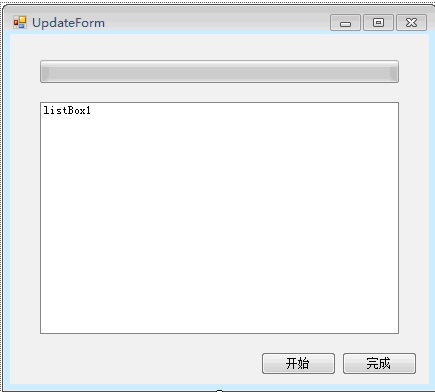
在这里展示一下更新的界面。挺丑的,别笑哈。
更新程序的配置信息如下
12 3 4 5 6 7 8
完整文档下载:http://pan.baidu.com/share/link?shareid=443378&uk=85241834
上一篇:jQuery常用功能大全
下一篇:C#语言牢固掌握base关键字的使用技巧