Windows8应用开发开发之RSS阅读器实例
- 时间:2015年04月02日 15:23:48 来源:魔法猪系统重装大师官网 人气:8749


先上运行截图:
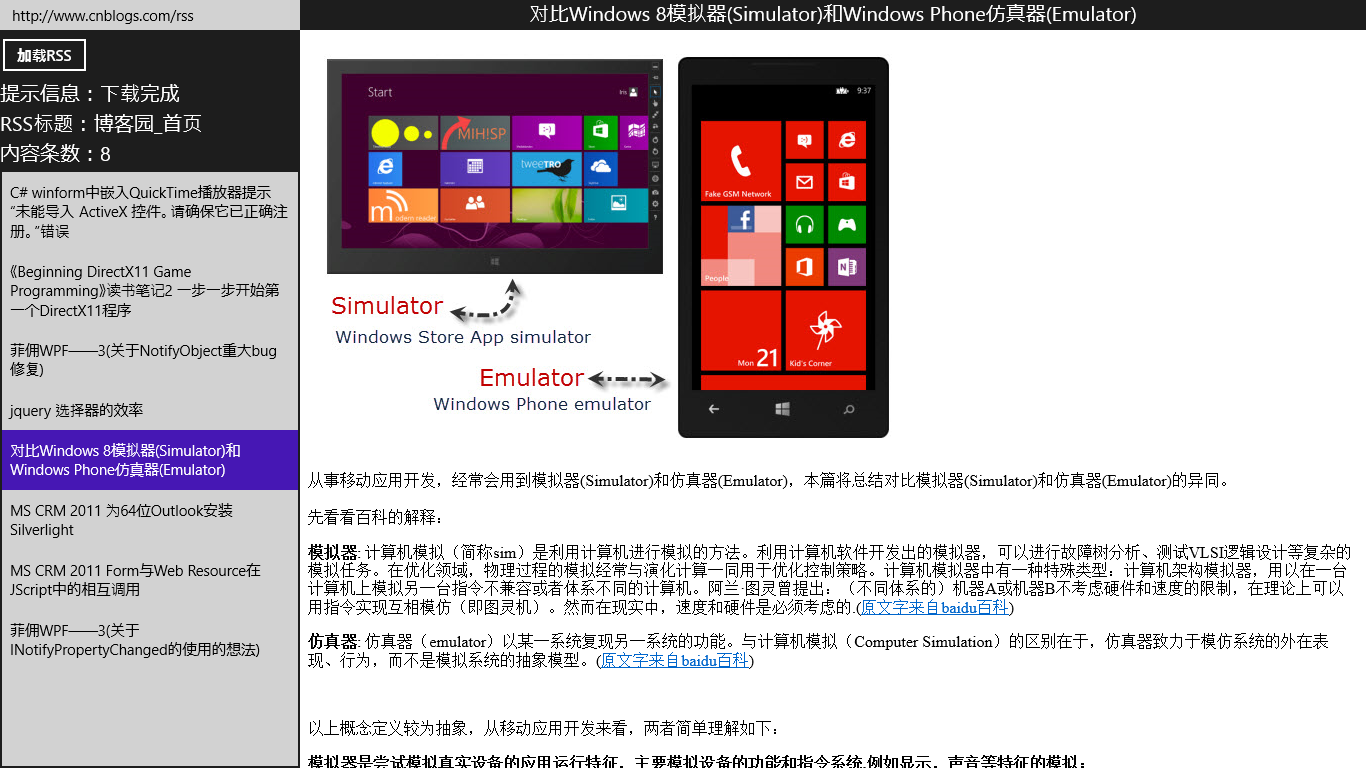
简单说明:右侧主要内容的显示使用了浏览器控件WebView,另外,一些说明放在了代码注释中。
本应用只有一张页面MainPage
前台代码如下:
XAML
19 10 15 17 1830 1619 6320 2321 22 24 5425 3226 27 28 29 30 31 33 34 35 3836 37 39 4240 41 43 4644 45 47 5348 5249 5150 55 6256 5957 58 60 61
后台代码如下:
C#
  1 using System;
  2 using System.Collections.Generic;
  3 using System.IO;
  4 using System.Linq;
  5 using System.Threading.Tasks;
  6 using Windows.Foundation;
  7 using Windows.Foundation.Collections;
  8 using Windows.Storage;
  9 using Windows.UI.Xaml;
 10 using Windows.UI.Xaml.Controls;
 11 using Windows.UI.Xaml.Controls.Primitives;
 12 using Windows.UI.Xaml.Data;
 13 using Windows.UI.Xaml.Input;
 14 using Windows.UI.Xaml.Media;
 15 using Windows.UI.Xaml.Navigation;
 16 using Windows.Web.Syndication;
 17
 18 namespace Win8RssReader
 19 {
 20     public sealed partial class MainPage : Page
 21     {
 22         SyndicationClient syndicationClient;
 23         SyndicationFeed currentFeed;
 24
 25         ///
 26         /// WebView在打开target="_blank"的超链接时会打开电脑上的浏览器,为了避免这种情况,这段js可通过更改DOM,使所有超链接的target="_self"。
 27         ///
 28         string MyJs { get; set; }
 29
 30         public MainPage()
 31         {
 32             this.InitializeComponent();
 33         }
 34
 35         async protected override void OnNavigatedTo(NavigationEventArgs e)
 36         {
 37             MyJs = await GetMyJs();
 38         }
 39
 40         private async Task GetMyJs()
 41         {
 42             StorageFile jsFile = await StorageFile.GetFileFromApplicationUriAsync(new Uri("ms-appx:///js.txt"));
 43             string jsText = await FileIO.ReadTextAsync(jsFile);
 44             return jsText;
 45         }
 46
 47         private async void btnGetFeed_Click(object sender, RoutedEventArgs e)
 48         {
 49             string feedUriString = txtFeedUri.Text;
 50             await GetFeedAsync(feedUriString);
 51             DisplayFeed();
 52         }
 53
 54         private async Task GetFeedAsync(string feedUriString)
 55         {
 56             Uri uri;
 57             if (!Uri.TryCreate(feedUriString.Trim(), UriKind.Absolute, out uri))
 58             {
 59                 txtMsg.Text = "url错误";
 60                 return;
 61             }
 62             if (syndicationClient == null)
 63             {
 64                 syndicationClient = new SyndicationClient();
 65             }
 66             syndicationClient.BypassCacheOnRetrieve = true;
 67             syndicationClient.SetRequestHeader("User-Agent", "Mozilla/5.0 (compatible; MSIE 10.0; Windows NT 6.2; WOW64; Trident/6.0)");
 68             txtMsg.Text = "开始下载...";
 69             try
 70             {
 71                 currentFeed = await syndicationClient.RetrieveFeedAsync(uri);
 72                 txtMsg.Text = "下载完成";
 73             }
 74             catch (Exception ex)
 75             {
 76                 txtMsg.Text = ex.Message;
 77             }
 78         }
 79
 80         private void DisplayFeed()
 81         {
 82             if (currentFeed != null)
 83             {
 84                 ISyndicationText title = currentFeed.Title;
 85                 txtFeedTitle.Text = title != null ? title.Text : "(没有标题)";
 86                 txtCount.Text = currentFeed.Items.Count.ToString();
 87                 listTitle.ItemsSource = currentFeed.Items;
 88                 listTitle.SelectedIndex = 0;//选中第0条,触发SelectionChanged事件。
 89             }
 90         }
 91
 92         private void listTitle_SelectionChanged(object sender, SelectionChangedEventArgs e)
 93         {
 94             var item = (SyndicationItem)listTitle.SelectedValue;
 95             DisplayCurrentItem(item);
 96         }
 97
 98         private void DisplayCurrentItem(SyndicationItem item)
 99         {
100             if (item != null)
101             {
102                 txtItemTitle.Text = item.Title != null ? item.Title.Text : "(没有标题)";
103                 string content = "(没有内容)";
104                 if (item.Content != null)
105                 {
106                     content = item.Content.Text;
107                 }
108                 else if (item.Summary != null)
109                 {
110                     content = item.Summary.Text;
111                 }
112                 content += MyJs;
113                 webViewContent.NavigateToString(content);
114             }
115         }
116     }
117 }
引用文件js.txt中的内容如下:
题外话:
感觉现在做Windows Store App开发的很少哦,真心希望能和感兴趣的朋友们交流交流。