WindowsPhone7中的XML读取、过滤以及数据绑定
- 时间:2015年04月02日 15:32:19 来源:魔法猪系统重装大师官网 人气:11469


在这个小教程,我将演示在Windows Phone 7如何让ListBox的数据绑定XML数据。我将使用LINQ to XML,以便加载和读取数据,而且我将展示如何实现一个基本的过滤。
首先让我们先创建一个Windows Phone 7的应用程序项目示例,并添加以下两个demo xml文件。
people.xml
<?xml version="1.0" encoding="utf-8" ?>Kate Smith 27 Tom Brown 30 Tim Stone 36 Ann Peterson 27
在这里我不得不感谢一直支持我的卤面网版主,是他让我提起兴趣写了这么一篇文章,再次感谢卤面网,一个非常不错的wp7开发论坛,后面我也将再次向大家发布几篇高质量文章,请大家到卤面上找我吧,呵呵
进入正题:
PeopleCustom.xml
<?xml version="1.0" ?>
下一步是创建一个示例类将被用来存储XML元素值:
public class Person
{
    string firstname;
    string lastname;
    int age;

    public string FirstName
    {
        get { return firstname; }
        set { firstname = value; }
    }

    public string LastName
    {
        get { return lastname; }
        set { lastname = value; }
    }

    public int Age
    {
        get { return age; }
        set { age = value; }
    }
}
为了读取XML文件的信息,我们将使用的XDocument
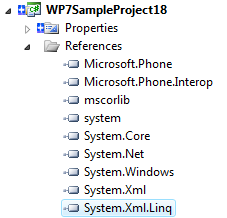
所以你首先需要添加System.Xml.Linq.dll引用,然后using System.Xml.Linq;
XDocument loadedData = XDocument.Load("People.xml");

var data = from query in loadedData.Descendants("person")
              select new Person
              {
                  FirstName = (string)query.Element("firstname"),
                  LastName = (string)query.Element("lastname"),
                  Age = (int)query.Element("age")
              };
listBox.ItemsSource = data;
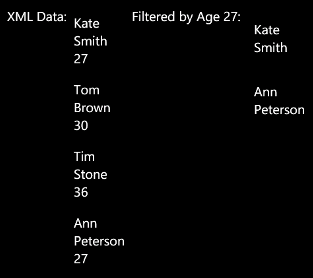
在接下来的例子中,我们将通过数据的“年龄”属性值过滤。源代码如下:
XDocument loadedCustomData = XDocument.Load("PeopleCustom.xml");
var filteredData = from c in loadedCustomData.Descendants("Person")
            where c.Attribute("Age").Value == "27"
            select new Person()
            {
                FirstName = c.Attribute("FirstName").Value,
                LastName = c.Attribute("LastName").Value

            };

listBox1.ItemsSource = filteredData;
为了显示的数据,我们将使用以下ItemTemplates绑定ListBox控件: