• 微软原版系统

  • 一键重装系统

  • 纯净系统

  • 在线技术客服

魔法猪系统重装大师 一键在线制作启动 U 盘 PE 系统 用一键重装的魔法拯救失去灵魂的系统
当前位置:首页 > 教程 > 电脑教程

MVC项目中实现图片显示代码

时间:2015年04月02日 15:43:38    来源:魔法猪系统重装大师官网    人气:3570

首先,有好一阵没有怎么写博客文章了.实在也是很多事情,确实没有停下来过.

这两天在讲解MVC方面的知识和项目实践,其中有一个小的细节,是有关于图片显示方面的,记录下来供大家参考

在MVC项目中,要显示一个图片,尤其是该图片是存放在数据库的话,还是可以继续使用原先Web Forms的那种ashx的方式。但也可以考虑下面的方式


1.创建一个ImageResult

using System;
using System.Collections.Generic;
using System.Linq;
using System.Text;
using System.Web.Mvc;
using System.Drawing;
using System.Drawing.Imaging;
using System.Web;

namespace Extensions
{
public class ImageResult : ActionResult
{
public ImageResult() { }
public Image Image { get; set; }
public ImageFormat ImageFormat { get; set; }
public override void ExecuteResult(ControllerContext context)
{
// verify properties
if (Image == null)
{
throw new ArgumentNullException("Image");
}
if (ImageFormat == null)
{
throw new ArgumentNullException("ImageFormat");
}
// output
context.HttpContext.Response.Clear();
if (ImageFormat.Equals(ImageFormat.Bmp)) context.HttpContext.Response.ContentType = "image/bmp";
if (ImageFormat.Equals(ImageFormat.Gif)) context.HttpContext.Response.ContentType = "image/gif";
if (ImageFormat.Equals(ImageFormat.Icon)) context.HttpContext.Response.ContentType = "image/vnd.microsoft.icon";
if (ImageFormat.Equals(ImageFormat.Jpeg)) context.HttpContext.Response.ContentType = "image/jpeg";
if (ImageFormat.Equals(ImageFormat.Png)) context.HttpContext.Response.ContentType = "image/png";
if (ImageFormat.Equals(ImageFormat.Tiff)) context.HttpContext.Response.ContentType = "image/tiff";
if (ImageFormat.Equals(ImageFormat.Wmf)) context.HttpContext.Response.ContentType = "image/wmf";
Image.Save(context.HttpContext.Response.OutputStream, ImageFormat);
}
}

}


2,创建一个Action


private string connection =ConfigurationManager.ConnectionStrings["northwind"].ConnectionString;


public ActionResult Image(int id)
{
var db = new NorthwindDataContext(connection);
var found = db.Employees.FirstOrDefault(e => e.EmployeeID == id);


if (found != null)
{
var buffer = found.Photo.ToArray();
ImageConverter converter = new ImageConverter();
var image = (Image)converter.ConvertFrom(buffer);
return new Extensions.ImageResult()
{
Image = image,
ImageFormat = System.Drawing.Imaging.ImageFormat.Jpeg
};

}
else
{
ViewData["message"] = "员工不存在";
return View("Error");
}

}
 

3.在页面(View)中调用

<%@ Page Title="" Language="C#" MasterPageFile="~/Views/Shared/Site.Master" Inherits="System.Web.Mvc.ViewPage" %>


Update

Update

<% using (Html.BeginForm()) {%>
<%: Html.ValidationSummary(true) %>


Fields


<%: Html.LabelFor(model => model.EmployeeID) %>


<%: Html.TextBoxFor(model => model.EmployeeID) %>
<%: Html.ValidationMessageFor(model => model.EmployeeID) %>


<%: Html.LabelFor(model => model.LastName) %>


<%: Html.TextBoxFor(model => model.LastName) %>
<%: Html.ValidationMessageFor(model => model.LastName) %>


<%: Html.LabelFor(model => model.FirstName) %>


<%: Html.TextBoxFor(model => model.FirstName) %>
<%: Html.ValidationMessageFor(model => model.FirstName) %>


<%: Html.LabelFor(model => model.Title) %>


<%: Html.TextBoxFor(model => model.Title) %>
<%: Html.ValidationMessageFor(model => model.Title) %>


<%: Html.LabelFor(model => model.TitleOfCourtesy) %>


<%: Html.TextBoxFor(model => model.TitleOfCourtesy) %>
<%: Html.ValidationMessageFor(model => model.TitleOfCourtesy) %>


<%: Html.LabelFor(model => model.BirthDate) %>


<%: Html.TextBoxFor(model => model.BirthDate, String.Format("{0:g}", Model.BirthDate)) %>
<%: Html.ValidationMessageFor(model => model.BirthDate) %>


<%: Html.LabelFor(model => model.HireDate) %>


<%: Html.TextBoxFor(model => model.HireDate, String.Format("{0:g}", Model.HireDate)) %>
<%: Html.ValidationMessageFor(model => model.HireDate) %>


<%: Html.LabelFor(model => model.Address) %>


<%: Html.TextBoxFor(model => model.Address) %>
<%: Html.ValidationMessageFor(model => model.Address) %>


<%: Html.LabelFor(model => model.City) %>


<%: Html.TextBoxFor(model => model.City) %>
<%: Html.ValidationMessageFor(model => model.City) %>


<%: Html.LabelFor(model => model.Region) %>


<%: Html.TextBoxFor(model => model.Region) %>
<%: Html.ValidationMessageFor(model => model.Region) %>


<%: Html.LabelFor(model => model.PostalCode) %>


<%: Html.TextBoxFor(model => model.PostalCode) %>
<%: Html.ValidationMessageFor(model => model.PostalCode) %>


<%: Html.LabelFor(model => model.Country) %>


<%: Html.TextBoxFor(model => model.Country) %>
<%: Html.ValidationMessageFor(model => model.Country) %>


<%: Html.LabelFor(model => model.HomePhone) %>


<%: Html.TextBoxFor(model => model.HomePhone) %>
<%: Html.ValidationMessageFor(model => model.HomePhone) %>


<%: Html.LabelFor(model => model.Extension) %>


<%: Html.TextBoxFor(model => model.Extension) %>
<%: Html.ValidationMessageFor(model => model.Extension) %>


<%: Html.LabelFor(model => model.Notes) %>


<%: Html.TextBoxFor(model => model.Notes) %>
<%: Html.ValidationMessageFor(model => model.Notes) %>


<%: Html.LabelFor(model => model.ReportsTo) %>


<%: Html.TextBoxFor(model => model.ReportsTo) %>
<%: Html.ValidationMessageFor(model => model.ReportsTo) %>


<%: Html.LabelFor(model => model.PhotoPath) %>


<%: Html.TextBoxFor(model => model.PhotoPath) %>
<%: Html.ValidationMessageFor(model => model.PhotoPath) %>


<% } %>


<%: Html.ActionLink("Back to List", "Index") %>

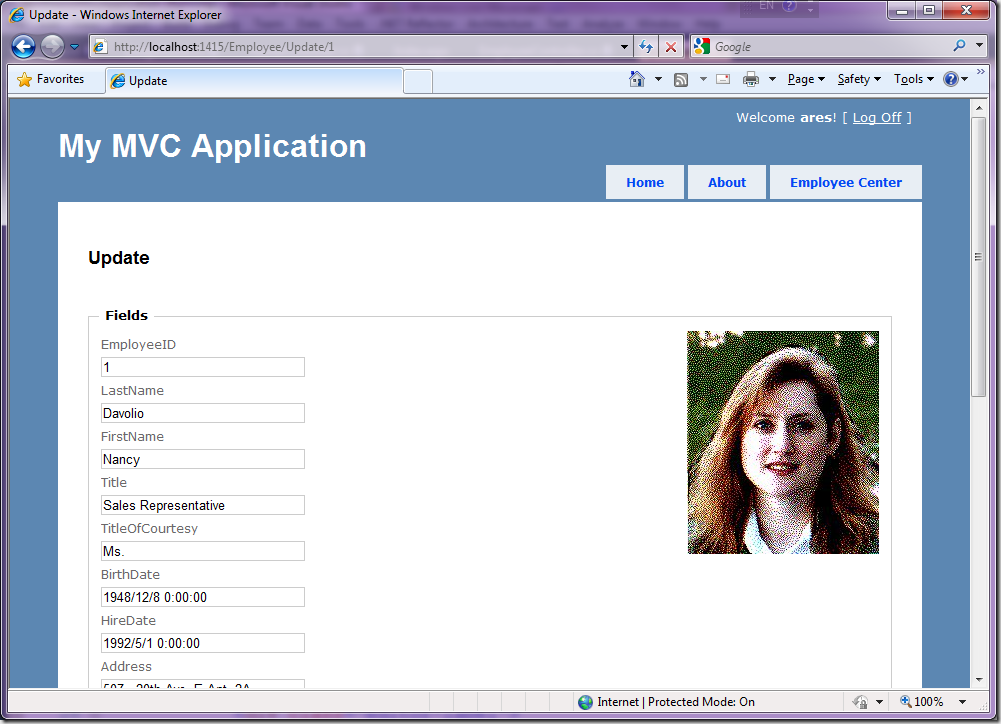
最后的结果如下,大家可以参考参考
MVC,项,目中,实现,图片,显示,代码,首先,有好,
栏目:电脑教程 阅读:1000 2023/12/27
Win7教程 更多>>
U盘教程 更多>>
Win10教程 更多>>
魔法猪学院 更多>>

Copyright © 2015-2023 魔法猪 魔法猪系统重装大师

本站发布的系统仅为个人学习测试使用,请在下载后24小时内删除,不得用于任何商业用途,否则后果自负,请支持购买微软正版软件。

在线客服 查看微信 返回顶部